
Vue 3.6: Vapor Mode Makes It the Fastest Vue Yet

Michael H.
September 22, 2026
Vue's newest minor release has entered release-candidate phase, but it is way more than the minor version bump might suggest. The team surrounding Evan You, its original creator, has been working for years on this release. Here's what it brings and why it matters.
tl;dr
The version is expected to leave the RC phase within the next few months, in autumn or winter. The migration process should be as easy as possible, and new features are an opt-in upgrade. Using them is a configuration option that can be toggled individually per component or app-wide. This means that all of your code remains the same. Vue 3.6 will bring major overhauls to both the reactivity system and its compiler mechanism, including rendering with its newest system called "Vapor Mode". This promises major reactivity performance improvements and a smaller bundle size.
Note: Version 3.6 will also include internal type improvements and changes to the Suspense feature, which this blog will not cover.
VDOM and Vue's History
Before you dive into the newest changes, you should understand how Vue's rendering mechanism worked in the past. Specifically, how the VDOM works, why many frameworks adopted it, and why they have moved on since.
What is the VDOM?
The web has been struggling with one question: how do you efficiently update the rendered elements inside the DOM (Document Object Model) tree, the browser's view of your page, when a state change happens?
Over time, multiple frontend frameworks adopted the VDOM ("Virtual DOM"), which represents the DOM as a JavaScript object tree of "VNodes". On change, a new virtual tree is created based on the original, then the system "walks" over both trees, diffing them in the process. The changes are then synced back to the original DOM. Apps with lots of reactive components are affected by this the most, since this process creates a copy of all elements kept in memory. Vue 3 reduced this cost for small state changes, while many other frameworks still compared the whole tree.
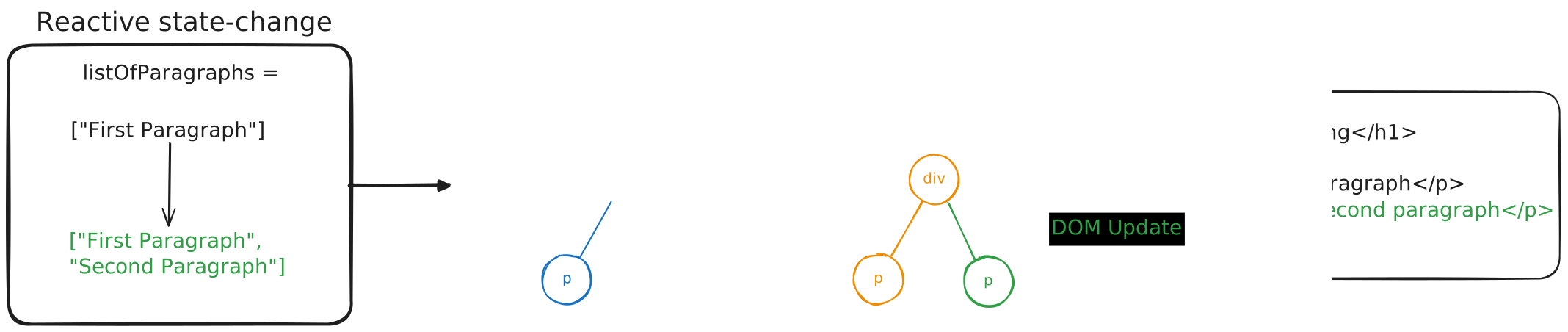
Vue's Previous Rendering Solutions
Vue's rendering system has gone through multiple revisions in the past and Vapor will become a major overhaul to its underlying core. 1
Version 1.0 worked with direct DOM manipulation.
Version 2.0 introduced the pure Virtual DOM as described above. Because it created quite a lot of memory overhead and the cost of "diffing", it became clear that this was not the best solution when it comes to performance.
Version 3.0 was still using the VDOM, but improved it with compiler-driven static analysis. This version uses "patch flags" as hints for the runtime to update elements, comparable to a shortcut. But this version was also limited in how far it could optimize, as it still required a lot of memory.
New to Vue?
Vapor Mode runs on Single File Components ("SFC") with <script setup>, never on the Options API, so the Composition API is the part of Vue worth learning first. Everything you pick up there carries over. If you are starting out, read our Beginner's Guide to Reusability first. It covers how to split logic into composables and components, which is the groundwork Vapor Mode builds on. Come back here once that clicks and learn more about the future of Vue.
Signals Under the Hood
Before diving into the details on Vapor Mode, you should explore the changes the Vue team made to the underlying reactivity system. It is another substantial change coming with version 3.6, adopting and improving "Signals".
What is a Signal?
When a state changes, the most naive approach would be to loop over all children downstream and update all callsites accordingly. The idea of "Recompute everything whenever anything might have changed" is wasteful though.
With Signals dependencies wire themselves up so that only affected pieces run and update. Signals are basically values with a getter and setter and they alert functions and computeds, when their value changes. On alert the callsites update, which makes systems feel dynamic and responsive.
There are multiple concepts of signals:
Push-based: "I changed! Everyone update!"
Pull-based: "I changed. But I won't tell anyone until someone actually asks for my new value."
Push-Pull explained on an example:
- On change, the signal pushes a "dirty" notification to its subscribers. "You are dirty - go and check later".
- Later, when something needs the update (like a screen redraw) it pulls the real value and recalculates.
This avoids cases where a push happened which was not yet needed, or pulling things which did not change.
const count = signal(0)          // a signal holding value 0
const double = computed(() => count.value * 2)  // depends on count

double.value  // 0
count.value = 5 // PUSH: "double, you're dirty" - but double.value isn't recalculated yet
double.value  // now something PULLS: recalculates 5*2, returns 10
In this case double is considered a "dependency" of count. With count.value the computed double "subscribes" to count. count keeps a list of its subscribers to notify when it changes.
Vue Loves Signals
With version 3.4 @johnsoncodehk contributed meaningfully to Vue's reactivity system optimizations. With Vue 3.5 the team updated to a Preact-style pull-based model and spun off alien-signals to keep exploring a push-pull hybrid approach. Its core has now been ported back into Vue 3.6.
Most frontend frameworks (excluding React) came to the consensus that signals are the ideal paradigm. Signals have since been proposed to TC39 for standardization. Sadly, a browser-native implementation is expected to be years away. Signals are often referred to as "fine-grained reactivity". Evan You mentioned SolidJS and its creator Ryan Carniato as inspiration to make the move as well. Both Solid and Svelte rely solely on signals, and Vue's reactivity system now fully adopts them too.
With its initial integration of the new reactivity approach, benchmarks showed a 14% reduction in memory usage and large speed gains. Multiple updates now make it one of the fastest reactivity implementations. Vue 3.6 ships with alien-signals under the hood as the new default, with no configuration needed.
Vapor Mode
So what's the gist? Vapor Mode builds on top of this new reactivity system. So-called "Vapor components" skip the VDOM entirely, eliminating VNode creation and tree-walking diff costs. Vapor compiles templates straight to optimized imperative DOM operations, with no virtual DOM at all. That means it already knows about all reactive pieces at compile time and optimizes for them. In a pure Vapor app, the VDOM runtime is then left out of the bundle completely, so you only get that size win if you go all in. This change benefits data-heavy reactive apps, low-end devices, and mobile the most.
In a quick test of ours with "rc.9", the Hello-World app came out to the following sizes:
| Vapor Mode | Build size | Gzip size |
|---|---|---|
| Off | 85.10 kB | 32.18 kB |
| On | 46.18 kB | 17.52 kB |
That is a 46% cut in both cases. Most of that gap comes from dropping the VDOM runtime, which is a big chunk of a small bundle like this one. In a bigger app, that runtime is a smaller slice of the total, so expect a smaller percentage win there. The promise of Vapor being smaller, should hold either way.
Fun Fact: Vapor Mode has already been mentioned in January 20232, but it took almost another 4 years to complete, while working in a separate Repo.3
In general, the same source code will produce a different output under Vapor Mode. The API and the framework knowledge stay the same, while the results get faster and less memory-hungry. The Vue team puts Vapor at the same level as SolidJS and Svelte 5, which are considered the fastest in multiple benchmarks. As an example, their own benchmark of mounting 100k components took about 100ms.1
The public js-framework-benchmark agrees. Filtered down to the major frameworks, Vapor comes out on top overall, with Solid and Svelte close behind. The same Vue version without Vapor lands a step below them, and the React variants further back.
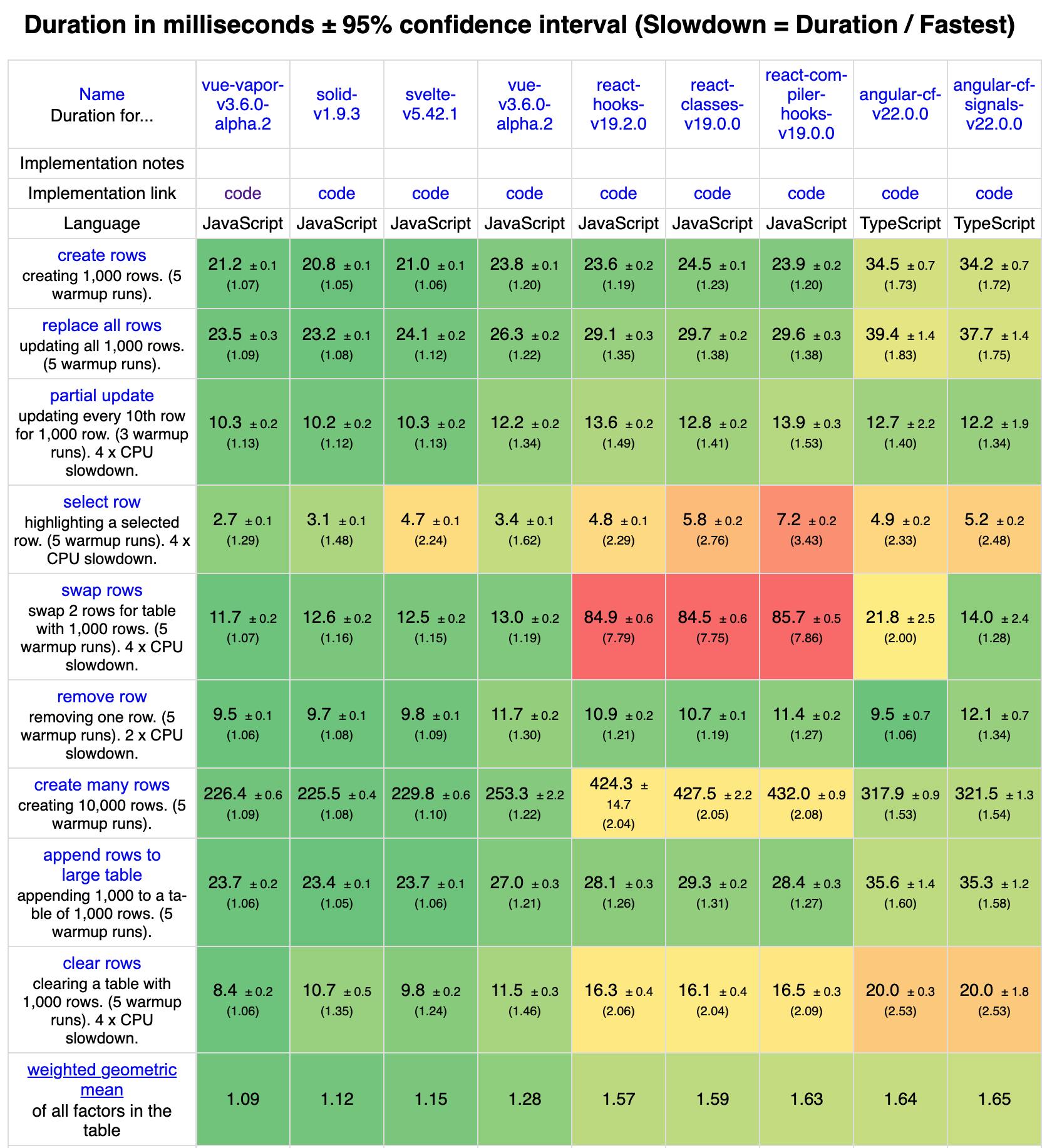
(2) This benchmark still relies on Vue v3.6.0-alpha.2 - a newer version may have impact on benchmark results.
Turning Vapor On
This feature is 100% opt-in and supports a subset of existing Vue APIs with mostly identical behavior. The exceptions are features that rely on VNodes or a component's public instance proxy. Opting in on selected components, running both the old and the new strategy side by side, is possible, but may increase bundle size.
Vapor Mode is feature-complete as of the RC, with rough edges left in the interop between both rendering modes. Its simple integration with minimal configuration makes it hard to skip. The update to version 3.6 will not include any breaking changes, and you can opt in single components to begin with. Be aware that the Options API is not supported. Vapor works on SFCs (Single File Components) using <script setup> and on template-only SFCs with no script block at all.
Turning on Vapor for single components is easy. Add vapor to your script block <script setup vapor> or its shorthand <script vapor>. The same marker also works on the template, which compiles the whole SFC in Vapor Mode and is the option for components without a script block:
<template vapor>
  <!-- ... -->
</template>
Pure Vapor applications, composed entirely of Vapor components, can use createVaporApp().
import { createVaporApp } from 'vue'
import App from './App.vue'

createVaporApp(App).mount('#app')
An app-wide configuration will not pull in the VDOM runtime.
Mixing Vapor and VDOM Components
To use Vapor components in a VDOM app instance created via createApp(), the vaporInteropPlugin must be installed:
import { createApp, vaporInteropPlugin } from 'vue'
import App from './App.vue'

createApp(App).use(vaporInteropPlugin).mount('#app')
A Vapor app can also include VDOM-based components using the vaporInteropPlugin, but this will include the VDOM runtime. Components written as render functions or in JSX stay VDOM components, so they need the plugin too, even inside a Vapor app. The plugin also allows nesting Vapor and non-Vapor components inside each other, but the release notes recommend against it.
Both kinds of component can sit side by side in the same template:
<template>
  <YourVdomComponent />
  <VaporComponent />
</template>
As mentioned, Vapor Mode does not support components in the Options API syntax. Suspense does work with Vapor components, including across the interop boundary, and every RC so far has shipped fixes for it. Suspense itself is still flagged as experimental in Vue, so that caveat is not specific to Vapor. The bigger open question is third-party libraries, which require an update to stay compatible.
Behavior That Differs From VDOM Mode
Three details behave differently:4
- Event delegation is opt-in. Document-level delegation is now per listener via the Vapor-only .delegate modifier: <button @click.delegate="onClick" />. The compilerOptions.eventDelegation option was removed in rc.2.
- Calling a slot renders it. slots.default() is not an inspection API in Vapor. It creates DOM nodes, registers effects, and claims SSR markup during hydration, so you cannot call it to decide whether to show a fallback.
- Custom directives use a different signature. A Vapor directive is a plain function whose value is a getter, read through watchEffect(), with an optional returned cleanup function. Directives you ship need a Vapor version.
Should You Adopt It Yet?
Before adopting Vapor Mode, always verify the integration and the support by your tools, framework, plugins, and codebase. To begin with, take these rules of thumb:
- 🟢 Use createVaporApp to build new apps using Vapor Mode and benefit from its easy configuration and performance-gains.
- 🟢 Migrating selected simple pages and components probably won't bring a huge performance gain, but are typical low-hanging fruits to start the migration process.
- 🟢 Continue with performance-critical modules.
- 🟡 Be careful with reliance on third-party libraries and tools - verify first.
- 🟡 Vapor Mode in Nuxt / SSR apps can be considered "under construction" - hydration is implemented and works, but every release candidate so far has shipped fixes for it.
- 🔴 Incompatibility: If your app relies a lot on the Options API, prioritize the migration to the Composition API first. With its release-candidate "rc.1" the changelog lists constraints not supporting app.config.globalProperties, getCurrentInstance() returns null, @vue:xxx element lifecycle hooks, v-memo, and properties on component template refs.4
Why Vue 3.6 Matters
Vue has been the framework you pick for the tooling, the docs, the DX, and a community that answers questions. Speed was fine, and if you wanted the fastest renderer you looked elsewhere. Version 3.6 removes that trade-off, which is why it's a new milestone in Vue's history.
That speed is not a developer detail. A smaller bundle and a faster first paint decide whether a visitor sees your page or bounces before it renders, and load time feeds directly into Core Web Vitals and search ranking. On a mid-range phone on mobile data, a pure Vapor app ships fewer kilobytes and parses less JavaScript before the page reacts to the first tap.
The other half of the milestone is how little it asks of you. React keeps changing what idiomatic React looks like: classes, then hooks, then concurrent rendering, now Server Components and a compiler. Each shift retrained the community and resplit the ecosystem. Vue changed its model once, with Vue 3, and has kept it since. 3.6 keeps that record too: same API, same knowledge, no breaking changes, and the fastest rendering path Vue has ever had sitting behind an opt-in flag.
That combination is rare. A performance jump this size usually arrives as a new framework or a major version that invalidates what you know. Here it arrives as a minor release you can adopt one component at a time.
Vapor Mode
Vue 3.6
Signals
Reactivity
Frontend Performance
Bundle Size
Read also

Philipp, 07/29/2026
Dein Prototyp war fast gratis. Was kostet der Weg in Produktion?
KI Engineering
Vibe Coding
Prototyp
Softwarekosten
Produktionsreife

Nick, 05/27/2026
Frontend Performance Meets Green Coding
Green Coding
Green IT
Carbon Footprint
Sustainability
Energy Tracking
Cloud Efficiency
Web Performance

Irena, 03/11/2026
Robotics in Balance: How digital solutions make physical processes smarter
Industry 4.0
Digital process optimization
Data visualization
Modular robotics solutions
Automation
Predictive maintenance
Smart Factory Software